Google Workspace
Using Securely | Workspace Apps | Current Users | AI Pro | FAQ | Restrictions for Use

Google Workspace
Select Google Workspace applications are now available to the WashU community using your WashU Key login.
Using Google Workspace Apps Securely
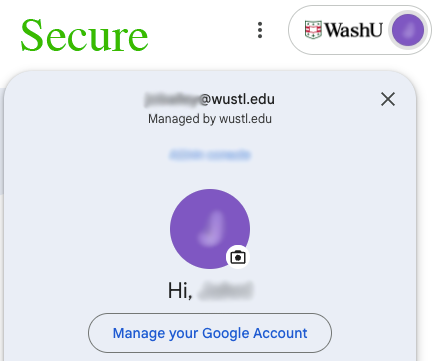
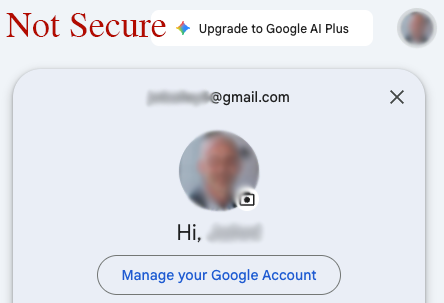
Google Workspace Apps
The following Google Workspace apps are currently available for use:

Gemini for Education
Available at no cost to WashU students, faculty and staff by logging in with your WashU Key.
Google’s most advanced AI models in a secure, education-focused environment. Gemini supports multimodal capabilities—working with text, images, and code—so you can handle diverse academic and research tasks in one place

NotebookLM
Available to Danforth Campus students, faculty and staff by logging in with your WashU Key.
Google’s AI-powered research tool capable of referencing multiple sources of information in a single workspace, enabling you to ask questions, create summaries, and generate audio overviews.
Resources for Current Users
Google AI Pro
WashU’s license for Gemini & NotebookLM provide generous quotas and usage limits that meet the needs for the majority of campus. For those advanced users who may be experiencing usage limits, WashU IT provides the option of paying for a Google AI Pro license. The most common reasons to need Google AI Pro are:
Gemini
- Increased context window
- Larger file uploads
- Increased usage quotas
- Video generation
- Deeper Google Workspace integration
NotebookLM
- Increased notebooks
- Increased sources
- Increased usage quotas for chats, overviews, quizzes, etc.
Interested in Google AI Pro? Request Google AI Pro
FAQ
Yes, the Gemini LTI, which integrates both Gemini & NotebookLM, is enabled in WashU’s MyCanvas! Please see Learn about Gemini LTI™ for additional details.
Restrictions for Use
Using Google Workspace applications with your WashU account is limited to University related activities, such as academic teaching or research. The use of Google Workspace applications with your WashU account for personal activities is prohibited.
Be sure to follow all legal, regulatory, and University policies when collecting or storing sensitive data. If unsure whether or not your tasks or documents contain sensitive data, contact the departments below for guidance.
- HIPAA Privacy Office for Protected Health Information (HIPAA)
- University Registrar for Protected Student Information (FERPA)
- Information Security, including Personally Identifiable Information (PII)
- Human Research Protection Office for the use of ClickUp in human research studies