Gemini
Using Securely | New Users | Current Users | AI Pro | FAQ | Restrictions for Use

Gemini
Google Gemini is now available to the WashU community. Part of Google Workspace, access to Google’s most advanced AI models in a secure, education-focused environment. Gemini supports multimodal capabilities—working with text, images, and code—so you can handle diverse academic and research tasks in one place.
Key Features:
- Advanced reasoning and problem-solving tools
- Real-time web search integration through Google Search
- Coding, data analysis, and visualization capabilities
- Context-aware image generation and interpretation
Using Gemini Securely
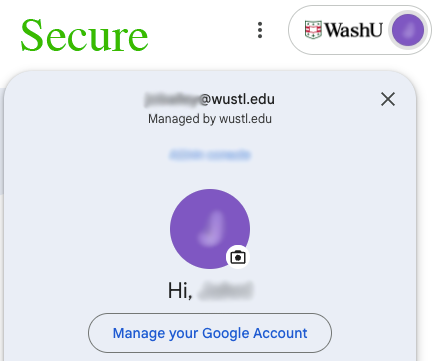
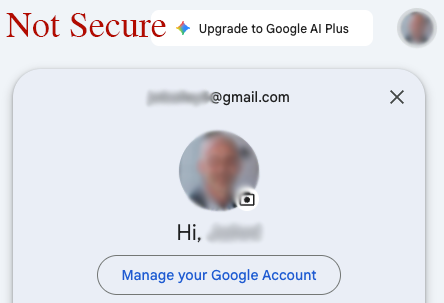
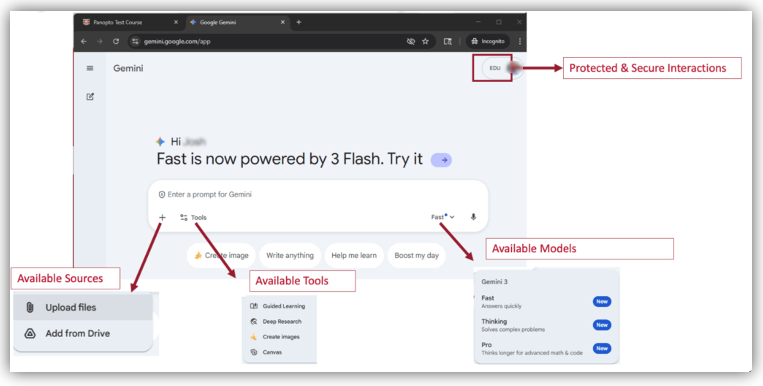
To verify that you are using WashU-Protected Gemini, look for the “EDU” label next to your Google Profile picture in the upper right corner. If you do not see ‘EDU’, click your profile picture and select your @wustl.edu Google profile.
Gemini for Education
Your AI assistant for education. Chat with Gemini to transform how you teach, learn, and work.
For New Users
Because many WashU community members currently have personal Google accounts, the following section provides instructions on accessing Google Services using your WashU account. Please follow these instructions to securely access Google Gemini.
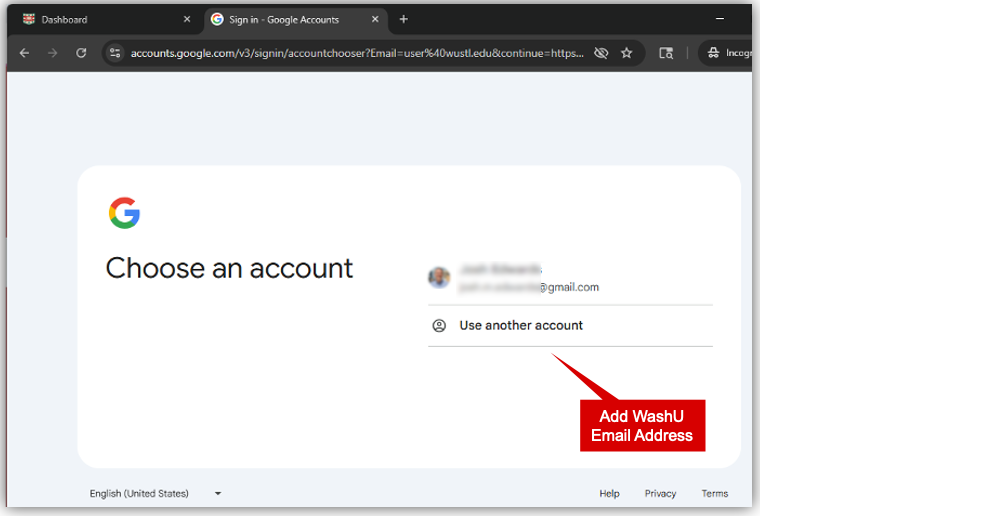
Click ‘Log in to Gemini’ to access the Google Account selector and use your WashU account.
If you don’t see your @wustl.edu in your list of Google profiles, click ‘Use another account’.
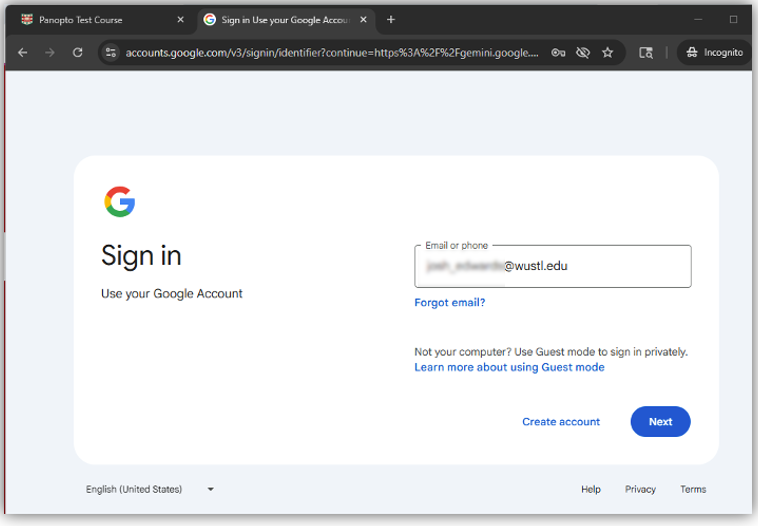
Enter your @wustl.edu email address in the email or phone box and press enter or click the ‘Next’ button.
You are now logged into Gemini using your WashU account and can securely interact with its features.
Resources for Current Users
Google AI Pro
WashU’s license for Gemini & NotebookLM provide generous quotas and usage limits that meet the needs for the majority of campus. For those advanced users who may be experiencing usage limits, WashU IT provides the option of paying for a Google AI Pro license. The most common reasons to need Google AI Pro are:
Gemini
- Increased context window
- Larger file uploads
- Increased usage quotas
- Video generation
- Deeper Google Workspace integration
NotebookLM
- Increased notebooks
- Increased sources
- Increased usage quotas for chats, overviews, quizzes, etc.
Interested in Google AI Pro? Request Google AI Pro
FAQ
All conversations in Google Gemini are encrypted in transit using TLS 1.2 or higher and at rest using AES 256 encryption. Google or any third party will not have access to conversations or data uploaded to Google Gemini.
Yes. Google Gemini can work across these formats seamlessly.
Yes. It includes real-time web browsing via Google Search.
Yes. You can upload multiple supported file types and reference them together.
No. Data in Google Gemini Edu is not used for training.
Yes, using the Gemini Mobile app on iOS and Android is secure, provided you are accessing using your WashU login. Click on your Gemini app’s profile and access using your @wustl.edu email address.
No, using the Gemini in Chrome feature is not a secure feature. Securely access Gemini from gemini.google.com. See “Using Gemini Securely” section at top of this page for detailed instructions.
WashU’s licensed version of Gemini does not currently allow users to delete individual chats. Chats are retained for 18 months and then are automatically deleted.
In the normal course of operation, WashU does not monitor or read your individual chat histories. However, specific legal or administrative circumstances, such as a litigation hold or an investigation, may require access to data.
Yes, the Gemini LTI is enabled in WashU’s MyCanvas! Please see Learn about Gemini LTI™ for additional details.
Restrictions for Use
Google Workplace for Gemini is limited to University related activities, such as academic teaching or research. The use of WashU’s instance of Google Workplace for Gemini for personal activities is prohibited.
Be sure to follow all legal, regulatory, and University policies when collecting or storing sensitive data. If unsure whether or not your tasks or documents contain sensitive data, contact the departments below for guidance.
- HIPAA Privacy Office for Protected Health Information (HIPAA)
- University Registrar for Protected Student Information (FERPA)
- Information Security, including Personally Identifiable Information (PII)
- Human Research Protection Office for the use of ClickUp in human research studies