OpenAI Personal Account Migration
Important information for users with personal OpenAI accounts
Benefits | Expectations | Options | Recommendations | Migration FAQ
If you previously created a personal ChatGPT account using your WashU email address and were invited to join the WashU ChatGPT Edu workspace, you will be prompted to either migrate your existing ChatGPT data to WashU’s environment or download your existing data for storage. Once you join the WashU ChatGPT Edu workspace, your personal account associated with your WashU email address will be deleted and replaced by the WashU-managed version.
ChatGPT does not provide options for changing the email address of an existing personal account or for transferring data from a personal account associated with your WashU email address to a personal account associated with a non-WashU email address.
Before requesting access and migrating your chat data to the WashU ChatGPT Edu workspace, WashU IT strongly recommends reviewing your chat history and deleting any sensitive or personal conversations that you do not want to be associated with your WashU account.
This article outlines what to expect when joining the WashU ChatGPT Edu workspace and how to decide between the two migration options.
NOTE: This migration process does not apply to personal OpenAI accounts created with non-WashU email addresses. Those accounts remain unaffected.
Benefits of using ChatGPT Edu
- Built for campus privacy and security: Conversations are not used to train OpenAI’s public models and WashU does not monitor your conversations. The platform includes enterprise-level security and administrative controls to protect institutional data.
- Smarter academic support: Students can receive personalized tutoring, study help, writing support, language practice and problem-solving across subjects, anytime they need it.
- Powerful tools for teaching and research: Faculty and researchers can generate course materials, summarize research, analyze data, brainstorm ideas and explore complex topics more efficiently.
- Help for everyday work: Staff can streamline routine tasks like drafting emails, creating documents, summarizing information and supporting campus services.
- Advanced AI, higher limits: ChatGPT Edu provides access to OpenAI’s newest models with higher usage limits than the free version, making it practical for regular academic and professional use.
What to expect when you accept the WashU ChatGPT Edu invitation
Before accessing the WashU ChatGPT Edu workspace, you should understand what will happen behind the scenes and what decisions you may need to make ahead of time. This applies especially if you already use ChatGPT with your WashU email address.
When your WashU email address is added to WashU’s ChatGPT Edu workspace:
- OpenAI will check whether your WashU email address is already associated with a personal ChatGPT account.
- If it is, you will be prompted to choose what to do with your existing account before you can proceed.
- You will need to either migrate your existing content (for example, chats and saved GPTs) into the WashU ChatGPT Edu workspace, or export and delete your content to start fresh.
Your WashU email address can belong to only one workspace at a time. If it is already used in a personal account, you will be required to resolve that before joining the WashU ChatGPT Edu workspace.
Once you are added to the WashU ChatGPT Edu workspace, your WashU ChatGPT usage will be managed by the university and subject to institutional policies. Any personal OpenAI activity linked to your WashU email account will become part of that managed workspace. Your personal account associated with your WashU email address will be deleted.
WashU IT recommends reviewing your account beforehand so you can decide what action is best for your needs when prompted.
Account Migration Options
When your WashU email address is added to the WashU ChatGPT Edu workspace, OpenAI will detect that your email address is already associated with a personal account. As a result, you will see a prompt asking what you would like to do with your exiting data. This prompt appears only if your WashU email address is already linked to a personal OpenAI account. To complete enrollment in the WashU ChatGPT Edu workspace, you must choose between the two migration options:
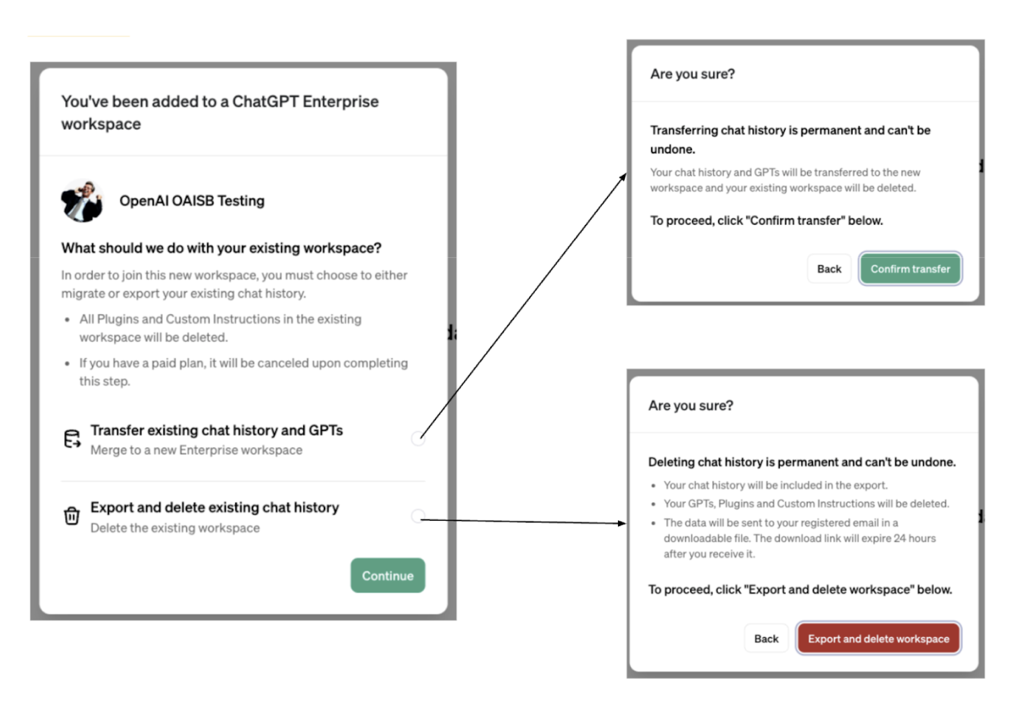
- Option 1: Transfer
- This option allows you to merge your personal account data into the WashU ChatGPT Edu workspace. It lets you retain your chat history, saved custom GPTs, and other activity by migrating them to the WashU ChatGPT Edu workspace.
- Certain personalized features, such as plug-ins and custom instructions, may be removed during this process.
- If you have an active ChatGPT Plus subscription, it will be canceled and refunded once the account is transferred.
- After migration, ChatGPT data associated with your WashU email address will be fully managed by WashU.
- Option 2: Export and Delete
- This option deletes your personal OpenAI workspace tied to your WashU email and clears the way for your WashU email address to be used in the WashU ChatGPT Edu workspace; however, it does not let you transfer your personal workspace data to the WashU ChatGPT Edu workspace.
- You will be offered the ability to export your chat history before it is deleted.
- If you have an active ChatGPT Plus subscription, it will be canceled and refunded once the account is transferred.
Once you finalize your selection, the action is permanent and cannot be reversed. Make sure to use the Settings menu in the ChatGPT interface to export anything you wish to retain before proceeding. For more on exporting data, see Exporting ChatGPT Data.
Recommendations
- If you want to retain past chats or custom GPTs, choose Option 1.
- If you prefer to start fresh or already use another email address for personal use, choose Option 2.
- You cannot change the email address associated with your personal ChatGPT account. You must either transfer or delete your data tied to your WashU email address.
- Before requesting access to the WashU ChatGPT Edu workspace, WashU IT strongly recommends reviewing your chat history and deleting any sensitive or personal conversations that you do not want to be associated with your account in the WashU ChatGPT Edu workspace.
- If you are unsure, use the Settings menu in the ChatGPT interface to export anything you wish to retain before proceeding. For more on exporting data, see Exporting ChatGPT Data.
Migration FAQs
No, unless you’re removed from the WashU workspace. As long as you’re active, your migrated history remains available. If your account is later deactivated (for example, if you leave the university or the workspace is removed by WashU), your history will be deleted.
Yes, as long as it is associated with a different (non-WashU) email address.
No. Once you choose to transfer or delete your personal workspace, the action is irreversible.
Get help
If you have questions or concerns about accessing the WashU ChatGPT Edu workspace or migrating your personal ChatGPT account, please contact the IT Service Desk.